Ubiquiti UniFi Cloud Key Gen2 Plus Hard Drive Upgrade & Failures has caused me a number of headaches over the last year or so. Read on to hear the issues I’ve experience and how I’ve overcome them.
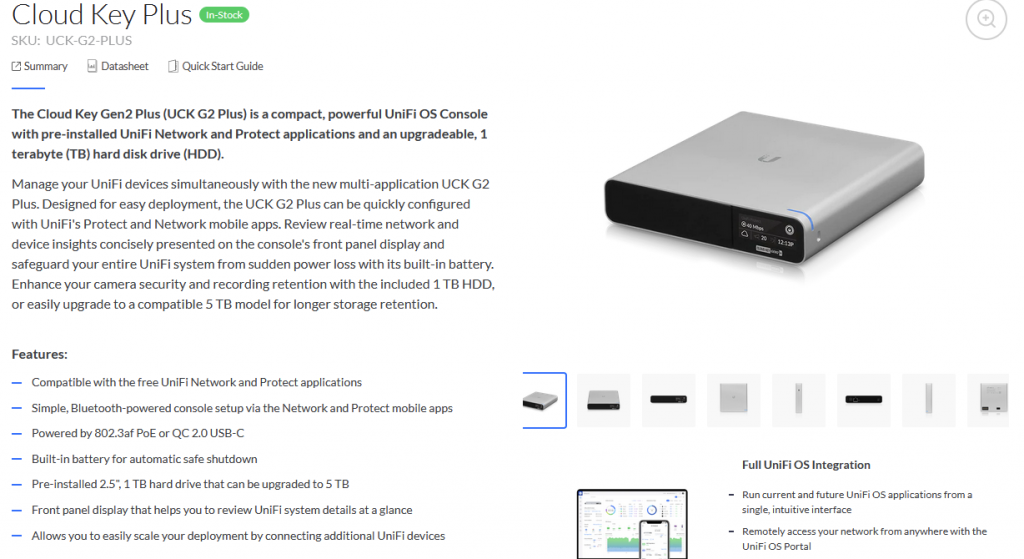
The Ubiquiti UniFi Cloud Key Gen2 Plus (UCK-G2-PLUS) is a small form factor device to run many UniFi applications on it, including UniFi Network and Protect. The Cloud Key provides video recording storage for the cameras and includes a 1TB Hard Drive as standard, which according to their product page can be upgraded to 5TB (see screenshot below).
Unfortunately I’ve personally experienced multiple hard drive failures when using a 2.5″ 5TB (Seagate ST5000LM000) or 4TB (Seagate ST4000LM024) Hard Drive. From my testing this appears to be down to the amount of heat that is generated. If the Cloud Key is sat on a metal surface, for example the bottom of a metal rack cabinet, the Hard Drives lasts a lot longer due to the metal casing of the Cloud Key dispersing heat through the metal rack cabinet. I’ve currently got a few in the field which have been running for 2+ years now. In any other environment the upgraded Cloud Key Hard Drive seems to fail anywhere between 2 weeks and 6 months.
I’m not aware of any other options apart from the 2TB 2.5″ WD Red or going with an SSD. I’ve not experienced any issues with the Toshiba 1TB Hard Drive (MQ01ABD100V) which comes installed with the Cloud Key Gen2 Plus (UCK-G2-PLUS). Using 2TB or 4TB Crucial MX500 Solid State Drives has also been successful, aside from the cost perspective. I would always stick to decent Solid State Drives, my preference being Crucial MX or Samsung EVO models, other TLC based SSDs should be durable enough.
The other option is to go with the Ubiquiti UniFi Network Video Recorder (UNVR) which isn’t always possibly if you have nowhere to mount it out of sight and where you won’t hear the 3.5″ surveillance rated Hard Drives rattling away.
I’ve also seen solutions where people have used a cable to connect an external hard drive to the internal SATA data/power connections. This is fine if you’ve got somewhere to put the mess it will look. Why oh why hasn’t Ubiquiti enabled the USB port on the back to use external drives for storage?!
I would be very interested to hear your experience with the Cloud Keys and Hard Drive upgrades!
Update 12/05/22: I currently have a ticket open with Ubiquiti Support regarding the Hard Drive issue with the Cloud Key Gen2 Plus and upgraded Hard Drives failing quickly, even though their product page states it is upgradeable. I was cheeky enough to ask for a UNVR as a replacement and they have agreed to do this after getting a little heavy with them. I’m awaiting the UNVR due to no stock in the EU but I will update when this arrives.
Update! Forgot to update this post, but Ubiquiti did honour the UNVR to replace the Cloud Key at no extra cost. All received and working well.

Not surprised to learn you’ve experienced failures with larger non-SSD drives. The CK Gen2 Plus runs very hot out of the box, so adding a larger/faster disk would produce even more heat. I’ve only upgraded using SSD disks and have not seen any failures to date.
Here are some tricks I can pass along is to help the Gen2 dissipate heat:
1) Don’t put anything else on it or near it. It needs air convection to cool.
2) If the shelf is wood (an insulator), raise the CK Gen2 up a little by placing something under it that will enable air flow. Two pencils spaced a few inches apart works well.
3) If the shelf is metal, this can actually help dissipate heat. Lay the unit directly on the metal shelf. But make sure there is nothing else on top of it or around it.
Thanks for the tips Scott. Definitely learn’t not to change the hard drive in them unless using SSDs!
I have some Samsung Spinpoint M9T 2TB drives that I am not using anymore (used to be in some laptops that I replaced with SSDs). Do you think one of these would work in the Cloud Key? It would basically double the storage.
They would work in the Cloud Key, however they probably wouldn’t last that long not being surveillance grade hard drives.
Thanks, I appreciate the reply. Is NAS operation much different then surveillance? I also have 4 of these Samsungs in a Synology DS414slim and they haven’t had any problems for over 4 years. I also looked up the Toshiba that comes stock in the Cloud Key and it’s also just a laptop drive.
Surveillance is usually constant writing of video data. NAS really depends on the use case, but a lot of the time it’s occasional read/writes depending on how many users and what it’s used for.
The Toshiba drive that comes with the Cloud Key is a 2.5″ drive, but I believe it is surveillance grade, not 100% sure on this though.
Customer has a failed HD in her stock cloud key 2. Do I install a new HD? How time consuming is that process? Is it plug and play?
Yes you can install a new HDD and it will just work. I would try and make sure it is a surveillance grade HDD.
Hello, will a SSD that’s smaller in size, 256 GB work as I replace the Toshiba 1 TB that comes with it? This is merely to test it out and we don’t have that much recording so want to see if this will work. Just curious. Thank you.
Yes any size SSD should work fine.